

Common questions
Does Omni's integration work with MetricFlow?
Does Omni's integration work with MetricFlow?
Yes. The dbt Semantic Layer is powered by MetricFlow, dbt’s open-source metric query engine. If you’ve defined metrics and semantic models using MetricFlow, this is the integration that brings them into Omni.
Where should I define metrics - in dbt or in Omni?
Where should I define metrics - in dbt or in Omni?
The most effective approach is a hybrid model that balances centralized governance with BI agility.Use the dbt Semantic Layer for:
- Cross-tool consistency: Define “Tier 0” canonical metrics (like Gross Revenue or Churn Rate) that must be identical across multiple platforms (e.g., Hex, Salesforce, or custom apps).
- Centralized governance: Use dbt when you want the data engineering team to own the “source of truth” through a formal pull request (PR) process.
- BI-specific metadata: Use Omni for logic that only impacts the analysis experience, such as color mapping, field grouping, drill paths, and friendly labels.
- AI and natural anguage: Add AI context and synonyms in Omni to help users query data in plain English.
- Speed and plasticity: Use Omni to prototype new metrics or create complex join logic and workbook-level calculations on the fly without waiting for dbt deployments.
Is the dbt Semantic Layer integration one-way or two-way?
Is the dbt Semantic Layer integration one-way or two-way?
The dbt Semantic Layer integration is a one-way import. Omni ingests metrics and semantic models defined in dbt, but it does not support exporting or pushing metrics authored in Omni back into dbt semantic files.
Requirements
To follow this guide, you’ll need:- A dbt semantic layer project configured in your dbt repository
- To have the dbt integration enabled for an Omni database connection
- Organization Admin permissions or Connection Admin permissions for the connection where dbt is enabled
Known differences and limitations
There are some behavioral differences between how dbt’s semantic layer and Omni handle certain concepts:Not currently supported
The following are not currently supported:
- Cumulative and conversion metrics
- Null filling
Aggregation time dimensions
Omni does not support the concept of an
agg_time_dimension, so you must carefully pick the dimensions and grains at which you view various metrics. Omni will append a comment to the field’s description to denote the default time field that should be used with the metric to help provide clarity.Time spines
Time spines exist in dbt’s semantic layer, whereas Omni allows you to fill dates when desired to conduct more complete analyses over various time windows.
Offsets and relative calculations
These can still be done in Omni via YAML configuration or the UI, depending on the specific goal.
Ratio metric calculations
When calculating ratio metrics, Omni joins the tables because its representation of metrics is still tied to a table.This can differ from MetricFlow’s approach of generating two separate metrics in subqueries, joining them, and then calculating the ratio. Omni’s approach automatically leverages symmetric aggregation to avoid miscalculations caused by fan outs.
Mapping dbt metadata into Omni
Dimensions
Dimensions defined in your dbt semantic layer are pulled into Omni. Metadata for descriptions, expressions, and labels are mapped onto their respective dimensions in Omni.Entities
Entities are created as their own dimensions in Omni and are used to create joins between tables mapped to their respective semantic models. Entities as a concept are mapped to relationships in Omni.Measures
If your dbt semantic layer project uses measures, they are mapped to measures in Omni.Metrics
dbt metrics are mapped into Omni as measures, with their location dependent on their type:| Metric type | How it maps in Omni |
|---|---|
| Simple | Mapped to the view in Omni that the table of the underlying expression is based on |
| Ratio | Mapped to the view in Omni that the denominator is based on |
| Derived | Mapped to the view in Omni that the first metric is based on |
| Cumulative | Not currently supported |
| Conversion | Not currently supported |
Semantic view labels
The names of semantic view files in dbt are mapped to Omni as labels on the correspondingdbt_models table.
Setup
Enable the semantic layer
- Navigate to Settings > Connections.
- Click the connection where dbt is enabled.
- Click the dbt tab on the connection’s settings page.
- Check the Enable semantic layer box.
- Click Save.
Perform a schema refresh
With the semantic layer sync enabled, the next step is to trigger a schema refresh to pull the metadata into Omni.
- In the connection settings page, click the Settings tab.
- Click the Refresh now button to trigger the refresh.
If you have branch-based schema refrehses enabled, the steps for triggering a refresh will be different than those listed here. Refer to the Schema refreshes guide for more information.
Troubleshooting
If Omni encounters issues while syncing semantic layer metadata, errors will surface in the model IDE: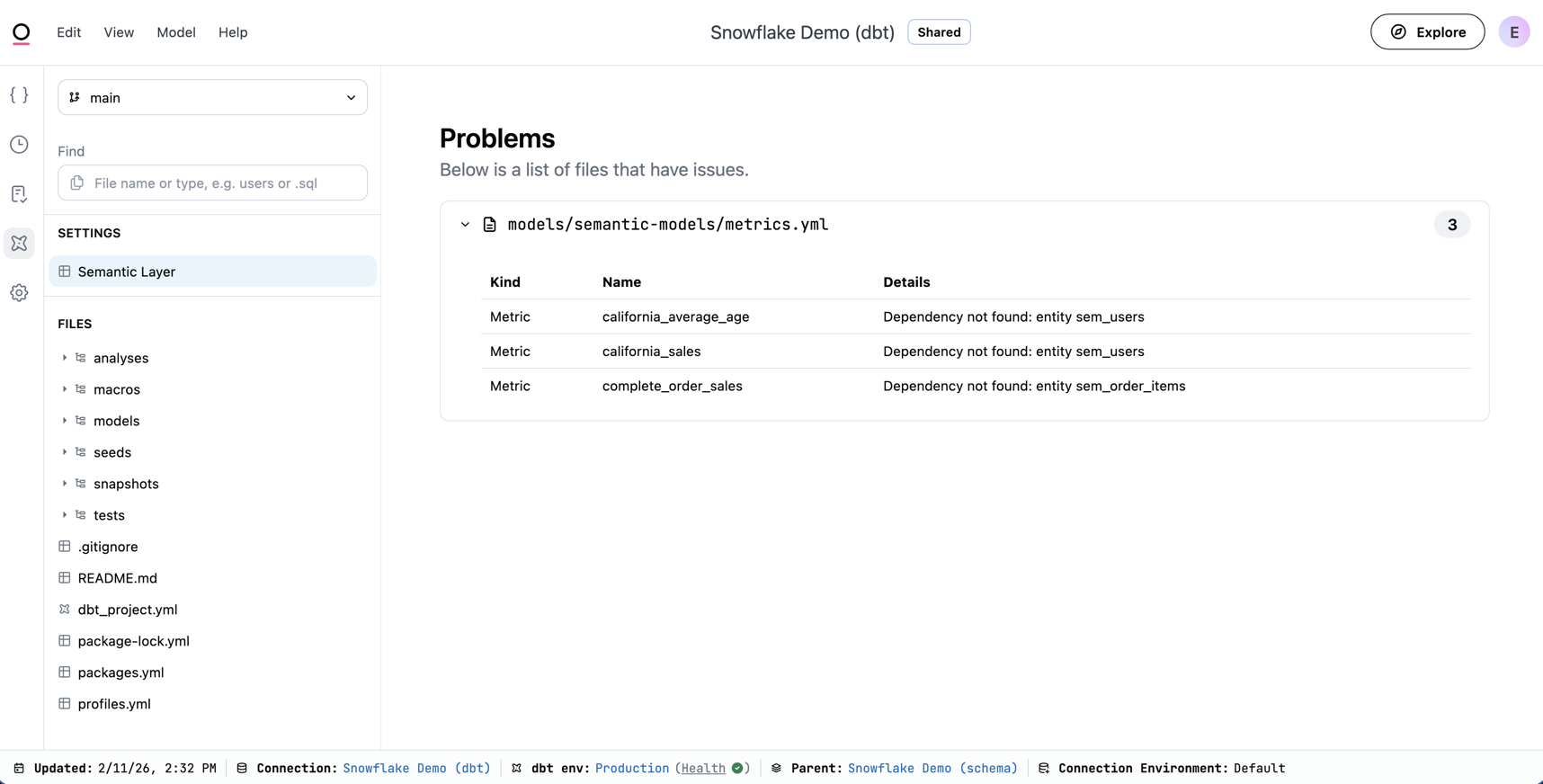
- Click Settings > Develop.
- Click the model you want to work with.
- In the left navigation, click the dbt icon.
- In the Settings section of the field browser, click Semantic Layer.
Why am I seeing 'Duplicate Field Name' errors when syncing?
Why am I seeing 'Duplicate Field Name' errors when syncing?
This error occurs when a measure defined in your dbt semantic layer has the exact same name as an existing column in the underlying dbt model.Because Omni maps your semantic layer measures directly onto the associated dbt model in the UI, a name collision acts like trying to have two columns with the same name in a single table.To resolve this, rename the measure in your dbt semantic layer (e.g., prefixing it with
mtm_ or semantic_) so it is distinct from the raw row-level column.Next steps
- Work with dbt models — Author and edit dbt models from Omni
- Schema refreshes — Sync dbt changes into your Omni model